How I build AI-powered
content systems
Overview
FLOP is a fictional streaming app for 1-star films.

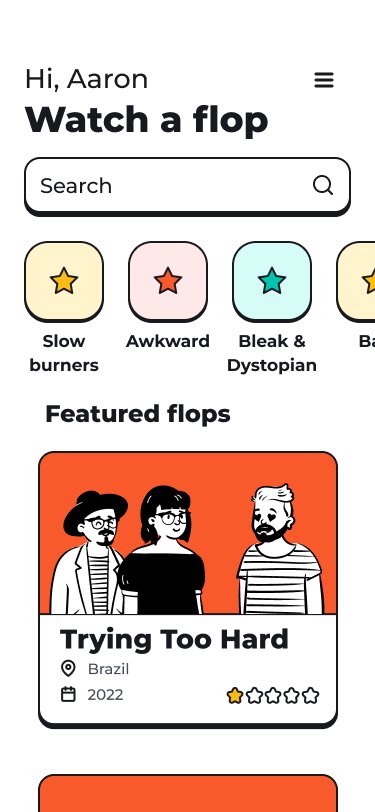
FLOP doesn’t have a content system yet. I show how it can scale content, keep its team aligned, and strengthen the brand.
Role: Content Designer, Systems and Governance
Tools: Figma, ChatGPT, Claude, NotebookLM
Problem
Content-heavy products scale quickly. As new features, platforms, and teams ship, the language begins to drift:
Inconsistent terminology
Uneven error handling
Confusing verbs
Loss of trust during failure states
This needs to be nipped in the bud.
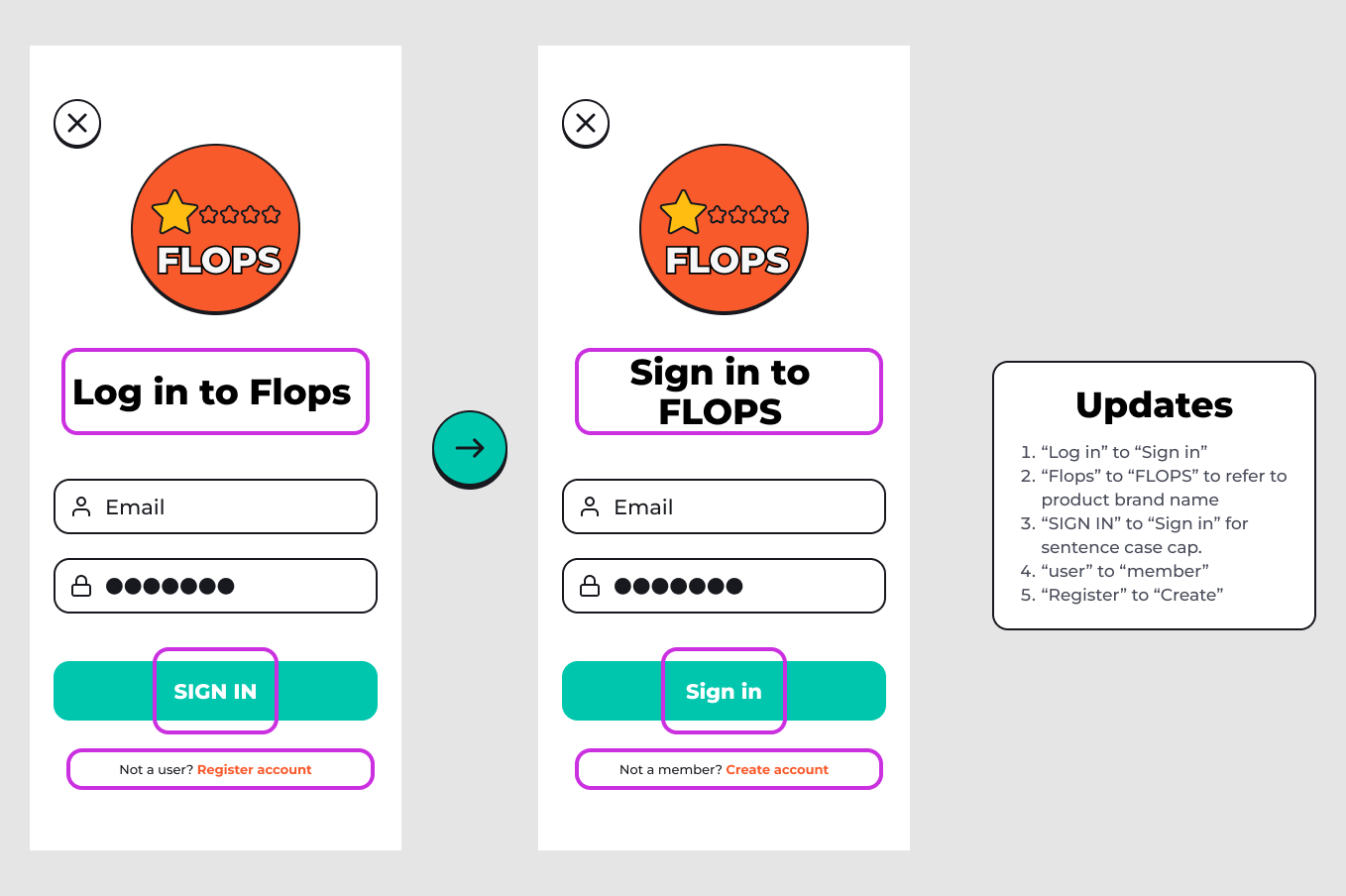
Step 1: Listen and learn
Goal: Understand the situation before creating guidelines.
Reach out to key people who may have brand documents, business goals, recurring support issues, and other relevant info
Understand platform differences: TV, mobile, desktop, web
AI
Prompt ChatGPT and Claude to list common failure scenarios in streaming apps (e.g., playback interruptions, network loss, payment errors, etc.)
Ask these AI models to group these by user impact and trust sensitivity
Received
A visual branding doc from Design
Business goals and user demographics doc from Product
A list of the most common tickets from Support
An AI-generated list of prioritized, high-risk areas: playback errors, network interruptions, and confusion around tip payments
Step 2: Content audit
Goal: Explore the content, its patterns, and its needs
Identify existing UI components, types of text, terminology conflicts, capitalization, types of errors, UI limitations, and key terms that need to be defined
Before any changes madeStep 3: Language principles
Goal: Establish decision-making constraints before any rules.
I defined a small set of principles to guide all language decisions
Ran it through ChatGPT and Claude to look for weaknesses
Language principles
FLOP uses language deliberately as a clean, lean system. These principles allow the product to scale without losing branding, clarity, or trust. 1. Plain language
Simple, clear language comes before branding. For example, onboarding uses the word films before new users learn that films are called flops.
Aim for a 7th-grade reading level.
2. One word, one job
Each approved term has a single purpose and a clearly defined scope.
Synonyms are avoided to prevent ambiguity, reduce cognitive load, and ensure consistent meaning across surfaces.
3. Language reflects user intent, not UI mechanics
Verbs are chosen based on what the member is doing, not how the interface behaves.
4. Follow platform conventions for clarity
Language respects platform expectations across mobile, desktop, and TV. For example, tap on mobile, click on desktop, and Exit on TV.
Goal: Lock down terminology before tackling sentence styles.
I built a governed word list
If some terms were unclear, inconsistent, or otherwise not right, I changed them to what’s best
Organized them not A-Z but in context groups
A-Z is good for searching but bad for understanding systems and designing for scalability
Context grouping shows where the words are used and with what other words
Again, I ran this list by ChatGPT and Claude to look for weaknesses
Also, I pasted all UI screens and asked these AI models to find any words I missed (in a company I would be very careful about this, especially if there are legal issues or unreleased flows)
Step 4: Word list
FLOP Word List
BRAND & PRODUCT
FLOP
Definition: The name of the product and brand.
Usage: Always written in all caps and used only for branding, titles, and product references
Avoid: Flop (as a brand name), FLOP, lowercase or sentence case when referring to the product
ACCESS
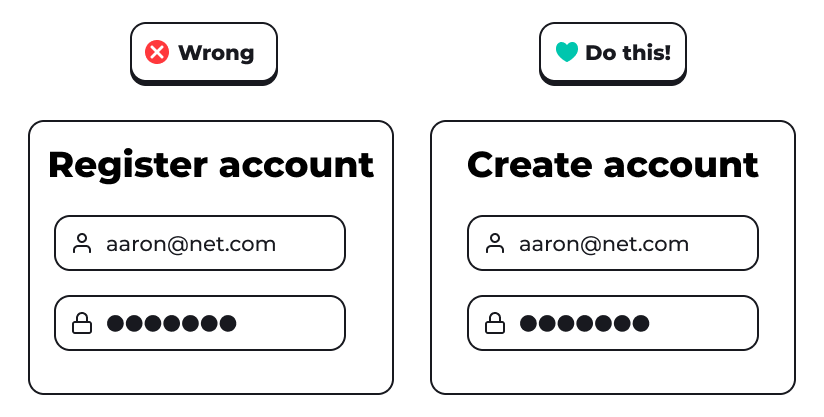
Create
Definition: The action of setting up a new account in FLOP.
Usage: Use Create to describe account creation actions and flows
Avoid: Register, Registration, Sign up (too similar to “sign in”)
Member
Definition: A person who has an account with FLOP.
Usage: Use member instead of user in all UI copy
Avoid: User
Account
Definition: A member’s credentials, security, and identity settings.
Usage: Used for authentication, privacy, and membership management
Avoid: Profile when referring to security or sign-in
Sign in
Definition: The action of accessing an existing account.
Usage:
Sign in as a verb (e.g., “Sign in to FLOP”)
Sign-in as a noun or adjective only (e.g., “sign-in screen”)
Avoid: Log in, Login
CONTENT
Flop
Definition: A single movie within the FLOP catalog.
Usage: Default noun for content items. Plural: flops.
Avoid: Movie, Film (allowed only on the first onboarding screen to establish meaning)
Director
Definition: The creator of a flop.
Usage: Used consistently across profiles, bios, and tipping flows
Avoid: Artist
Follow
Definition: The action of tracking a director so you can see their flops and tip them.
Usage: Sole verb for this relationship
Avoid: favorite, subscribe, friend
PLAYBACK
Playback
Definition: The act or state of watching a flop.
Usage: Used in settings, errors, and technical descriptions
Avoid: Player as a user-facing term, Watching mode
History
Definition: A list of flops a member has previously watched.
Usage: Used consistently in navigation and settings
Avoid: Watch history, Viewing history
Leave
Definition: The action of abandoning a flop or playback flow where progress may be lost.
Usage: Used only when exiting a specific flop or flow
For closing or exiting the app, see “Exit”.
Stay
Definition: The action of remaining in the current flop or playback flow.
Usage: Used as the safe alternative paired with Leave.
Avoid: Cancel, Back
NAVIGATION
Search
Definition: Direct lookup of flops or directors.
Usage: Used for fields and actions involving direct input
Avoid: Find, Explore, Discover at the field level
Settings
Definition: The configurations for FLOP.
Usage: Used consistently across the app
Avoid: Preferences, Options
Support
Definition: Help, feedback, and issue reporting.
Usage: Used as the sole label for assistance
Avoid: Customer support, Help desk
MONETIZATION
Tip
Definition: Monetary support given to a director.
Usage: Used in all payment and support flows
Avoid: Donate, Donation, Charity or fundraising language
SYSTEM
Continue
Definition: The action of progressing forward in a flow.
Usage: Used in onboarding and step-based flows
Avoid: Next
Exit
Definition: To close the FLOP app on desktop or TV platforms.
Usage: Indicates leaving the app itself, not a flop or playback flow. Not used on mobile.
Avoid: Close, Leave (reserved for abandoning a flop or playback flow)
Try again
Definition: The primary recovery action after an error.
Usage: Used for all retry states
Avoid: Retry
Step 5: Writing guidelines
Goal: Establish writing at the sentence level for predictability.
Clarity and sentence length
Capitalization (sentence case)
Punctuation
Numbers and money
Ampersands
Error tense (can’t vs couldn’t)
Voice and agency (“we” vs “you”)
Writing Guidelines
1. Voice and tone
a. The FLOP voice is quietly confident and cultured like the owner of an indie movie theater.
b. Tone adapts by context.
Discovery & editorial: Subtle personality is allowed. Language may be dry or opinionated, but never ironic.
Playback, errors, payments, settings: Neutral and literal. Clarity comes first.
c. Say what’s happening, plainly
2. Be clear
a. Write to be understood on first read. Avoid jokes, metaphors, or irony in errors, payments, settings, and privacy.
3. Use contractions
a. Contractions (e.g., “can’t”) sound natural. Use them in UI copy to sound human and direct.
Avoid non-contracted forms unless required for legal or accessibility reasons
Avoid uncommon contractions such as ain’t and y’all
4. Keep sentences short and declarative
a. Favor simple sentence structures.
One idea per sentence
5. Capitalization
a. All UI copy in FLOP uses sentence case by default.
Screen titles
Headings
Body copy
Button labels
Form labels
Error messages
Settings names
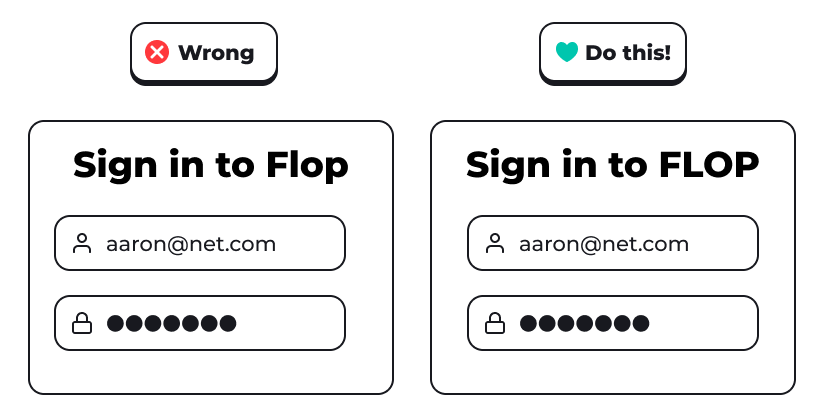
Exception: the brand name FLOP is all caps. This helps differentiate it from the common noun flop, which refers to a movie available in the app. It’s also just for general branding as it movie theaters use all caps.
6. Punctuation
a. Periods
Use periods in full sentences in body copy
Omit periods in headings, labels, and button text
b. Commas
Use to improve readability, not rhythm
Avoid long, compound sentences that rely on multiple commas
c. Colons and ellipses
Avoid ellipses (…) in UI copy
Use colons only in labels or structured lists when clarity requires it
d. Exclamation points
Do not use exclamation points in the product
Avoid: Saved!, Try again!
7. Ampersands (&)
a. Use ampersands in flop titles, UI labels, or tight spaces where brevity improves clarity. In all other cases, use “and” by default.
Do: Genre: Bleak & dystopian, Page: Terms & privacy
Don’t: We couldn’t save your progress & your history.
Exceptions: Established brand or feature names such as AT&T
8. Errors
a. Explain what’s wrong before telling the member to do.
People need orientation before action. Jumping straight to a fix increases confusion and anxiety.
b. Use can’t for current errors that require action before trying again
Ex: Heading: Can’t play this flop Body: Check your internet connection and try again.
Don’t use unable
c. Use couldn’t for errors when the user can try again without taking other actions first
Ex: Heading: Couldn’t save your progress Body: Check your connection and try again.
Don’t use unable
d. Guide toward one clear solution
Multiple competing actions slow decision-making.
9. Numbers
Use numerals for clarity and scannability. Numbers should be easy to parse at a glance.
a. Use numerals (0–9, 10, etc.) instead of spelling numbers out
Do: 3 flops available, Try again in 10 seconds
Don’t: Three flops available, Try again in ten seconds
Exceptions:
Spell out numbers only when they start a sentence
Three flops were added today. (rare; usually rewrite instead)
b. Ranges
Use an en dash or “to” for ranges
1–3 minutes or 1 to 3 minutes
Avoid slashes (/) for ranges.
c. Money
Use numerals with currency symbols
Tip $5
$99 per year
Avoid spelling out currency.
d. Dates & time
Use numerals for dates and time units
5 minutes ago
2 hours remaining
Avoid vague terms like soon or a while.
e. Ordinals
Use numerals with suffixes
1st flop watched
Step 7: Scalability test
Goal: Validate the system and enable repeatable enforcement with AI.
I used NotebookLM to test the rules against real UI copy. This works with any source-grounded LLM and helps catch inconsistencies early, without replacing human judgment.
To the right are standardized, repeatable prompts designed to make validation fast with consistent, predictable results.
These prompts are intentionally designed for human review and decision-making. However, they could be easily rewritten to have AI output the corrected copy first with all the changes and rules cited below.
List of standardized prompts
Rule compliance
Use: Validate copy against all writing content system documents.
Prompt: Review the UI copy below against the FLOP language principles, word list, and writing guidelines:
Heading: [text]
Body: [text]
Context: [optional]
Expected output: A list of any violations with rules cited. Copy not rewritten by AI. Only errors are pointed out. Human judgment required for changes.Legal check
To check copy against a specific legal issue (e.g., a new law only in the UK), you can add a new legal document and deselect all other sources.
Prompt: Review the UI copy below against the UK Policy source:
[text]
Expected output: A list of any violations with rules cited. Copy not rewritten by AI. Only errors are pointed out. Human judgment required for changes.
Step 8: Results
Before
Terminology inconsistency
Language debates instead without a single source of truth
Unclear error patterns
High learning curve for new contributors
After
Consistent terms and fewer debates
Guidelines sped up reviews and approvals
Error copy has predictable, reusable patterns
New copy can be validated quickly using the system
What this enables
Faster onboarding for new team members
More consistent user experiences
Less time spent re-reviewing the same issues
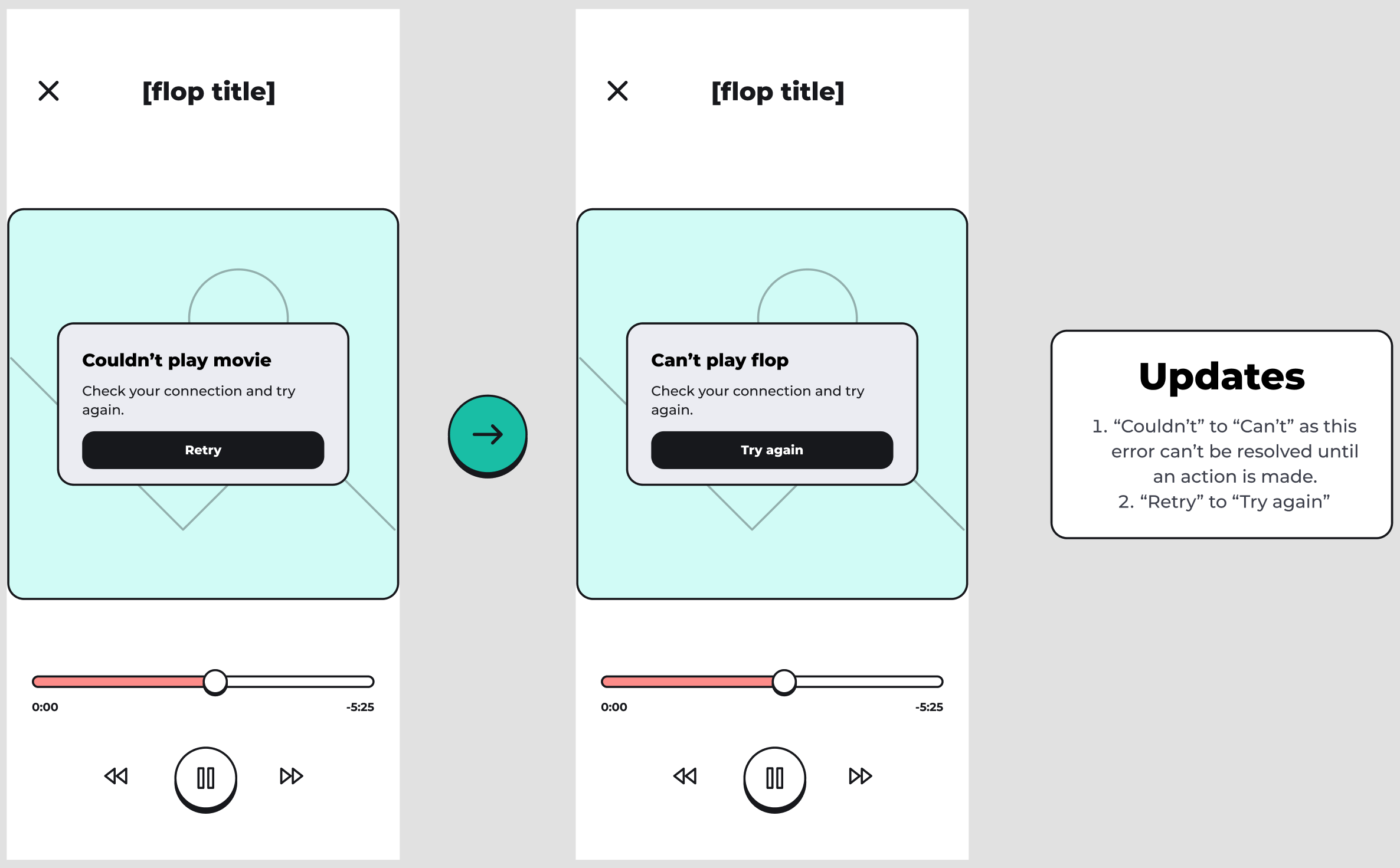
Example of a corrections made as per new content system